

Design a photo sharing app - Instagram, Flickr, Pinterest - is really two hard problems wearing one prompt. There's the media problem: users upload huge photo files, and you have to store, process, and serve them to millions of viewers cheaply and fast. And there's the feed problem: every user opens the app to a personalized, fresh stream of the people they follow, and that stream has to load instantly. Get either wrong and the app is unusable. Most candidates spend the whole hour on one and forget the other.
We'll build it end to end on a 60-minute budget using the 4-step framework: about 10 minutes scoping, 15 on the high-level design, 25 on the deep dive, 5 to 10 to wrap up.
Step 1: Scope it - and separate uploading from viewing
"Design a photo sharing app" hides a dozen possible products. Pin down which features, and the scale, before drawing anything. Ask, and stay ready for messy answers.
You: What are the core features - upload photos, follow people, a home feed, likes and comments? Interviewer: Upload, follow, and a home feed of the people you follow. Likes and comments are secondary.
You: Is the feed reverse-chronological, or ranked by some relevance score? Interviewer: Keep it reverse-chronological for now.
You: What scale - daily active users? Interviewer: You tell me.
You: I'll assume 100 million daily active users and design for that - stop me if you had a different order of magnitude in mind. Interviewer: Fine.
You: Photos only, or video too? Video changes the media pipeline a lot. Interviewer: Let's do photos. Actually - throw in short videos as well.
There's the curveball. Video is not a free add-on - it means transcoding into multiple bitrates, adaptive streaming, and far bigger blobs. Name the cost and park it: "Video needs a transcoding pipeline and adaptive-bitrate streaming on top of the image path - I'll design the photo pipeline so video slots in as a heavier variant, and detail it only if we have time." Then keep moving.
The rule underneath: use a number when they give one, assume-and-state when they punt, and when they bolt on scope, name its cost and defer. Written as precise scope:
Functional requirements
- Upload a photo with a caption.
- Follow and unfollow other users.
- A home feed of recent posts from the people you follow, reverse-chronological.
- View a photo (and its different sizes: feed thumbnail, full screen).
- Likes and comments: acknowledged, secondary.
- Short video: acknowledged, deferred (heavier variant of the photo path).
Non-functional requirements
- Read-heavy - viewing photos and feeds vastly outnumbers posting.
- Low latency - the feed and its images must load fast, everywhere in the world.
- High availability for the read path; durability for uploaded originals (never lose a user's photo).
- Eventual consistency is fine - it's okay if a new post takes a second or two to appear in followers' feeds.
- Scale to 100M daily active users.
Back-of-the-envelope estimate
A few numbers so every decision has something concrete to point at (the method is in back-of-the-envelope estimation).
- Uploads. Say 100M DAU and, on average, one upload per user per two days - about 50M new photos/day. That's
50M / 86,400 s, roughly600 uploads/secondaverage, call it a few thousand per second at peak. - Storage. Keep the original plus a few resized versions - budget ~2 MB total per photo across sizes.
50M x 2 MB = 100 TB/day, about36 PB/year, growing forever. That number - tens of petabytes a year - is the one that decides where media lives. Hold onto it. - Reads. This is the lopsided part. If each of 100M users opens the app several times a day and each session loads dozens of images, you're looking at tens of billions of image fetches per day. Reads dwarf writes by a hundred to one or more, and almost all of that traffic is static image bytes.
Two forces fall out immediately: petabytes of write-once, read-forever media (a storage-and-delivery problem) and a hundred-to-one read-heavy, personalized feed (a fanout-and-caching problem). The whole design is those two shapes.
Step 2: High-level design
I'll reason each piece in from a number rather than draw a finished box diagram and justify it after. Two data types drive everything: the heavy binary photos, and the light metadata around them.
Where do the photos live? Object storage, not a database
We estimated tens of PB/year of write-once photos, each read possibly millions of times. A database is the wrong home for that - storing multi-megabyte blobs in rows bloats it, wrecks its caching, and costs a fortune. The right home is an object store (Amazon S3, Google Cloud Storage): purpose-built for cheap, durable, effectively unbounded binary storage, addressed by a key. Photos go there; only a pointer (the object key/URL) goes in the database.
Two consequences worth stating up front, because they shape the upload and view paths:
- Uploads should not flow through your app servers. Pushing every 2 MB original through your application tier wastes bandwidth and ties up request threads. Instead the app server hands the client a short-lived, permissioned upload link and the client uploads the bytes straight to the object store. That link is a presigned URL - the app server proves the user is allowed to upload, without ever touching the file itself.
- Reads should not flow through your app servers either. At tens of billions of image fetches a day, you never want origin servers serving raw bytes. You put a CDN in front of the object store, so photos are cached at edge locations physically near each viewer. The app returns image URLs; the bytes come from the nearest edge.
The upload path: presign, upload direct, process async
Putting the upload flow together: the client asks the app server for an upload URL; the app server authenticates the request and returns a presigned URL; the client uploads the original directly to the object store; the client confirms, and the app server writes the post's metadata row. Then an asynchronous image-processing step kicks in - because the one original isn't enough. The feed needs a small thumbnail, the full-screen view needs a medium size, different screen densities need different resolutions. Generating those on the fly per view would be wasteful, so a worker resizes the original into a fixed set of variants once, right after upload, and stores each back in the object store.
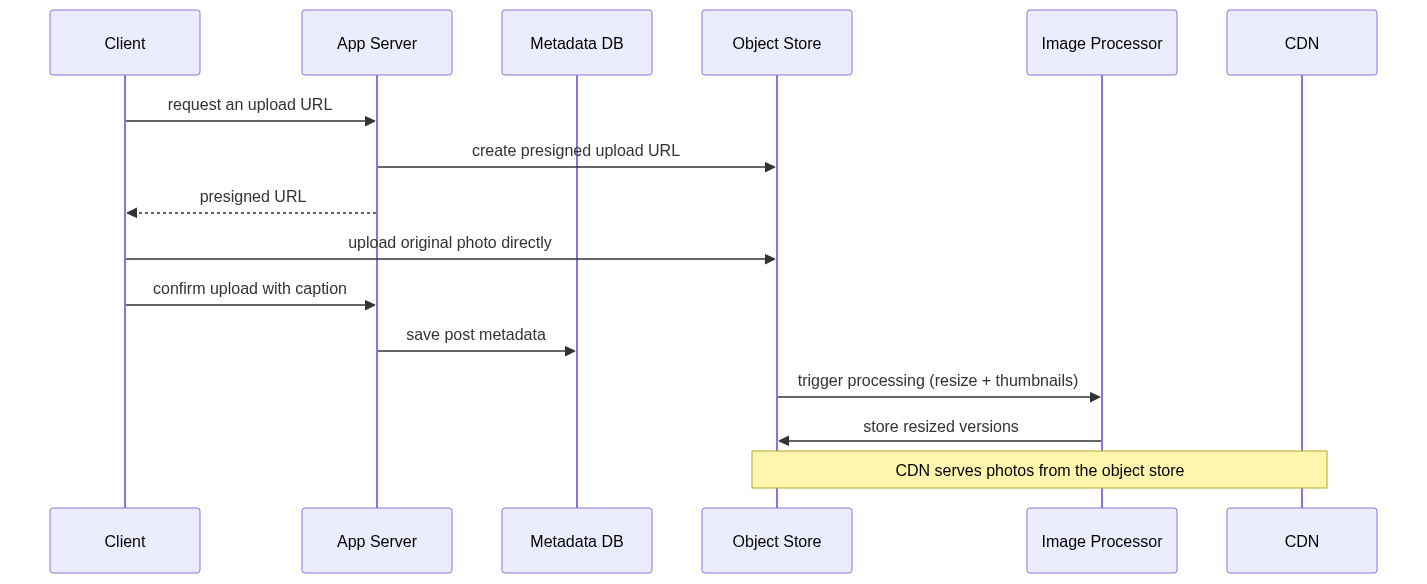
The metadata: which database?
Metadata is small and structured: a posts record (post id, author id, caption, object keys, created-at), the users table, and the follow graph (who follows whom). Posts and users are a clean relational fit - a database like PostgreSQL, made scalable with replication and sharding, sharded by user or post id. The follow graph is the one piece that's shaped differently: it's a many-to-many relationship you traverse constantly ("give me everyone who follows user X"), so it's often kept in its own store optimized for that lookup - a graph database, or just a well-indexed relational table sharded by user. Either works; the point is that fanout will hammer this "who follows X" query, so it needs to be fast.
The feed: two flows, publishing and reading
Everything so far serves the two feed flows. Publishing: when someone posts, that post must reach their followers' feeds. Reading: when someone opens the app, their feed must load instantly. Because we're read-heavy and latency-sensitive, the feed is precomputed and cached rather than assembled from scratch on every open - the deep dive is exactly how. With that, the architecture assembles itself:
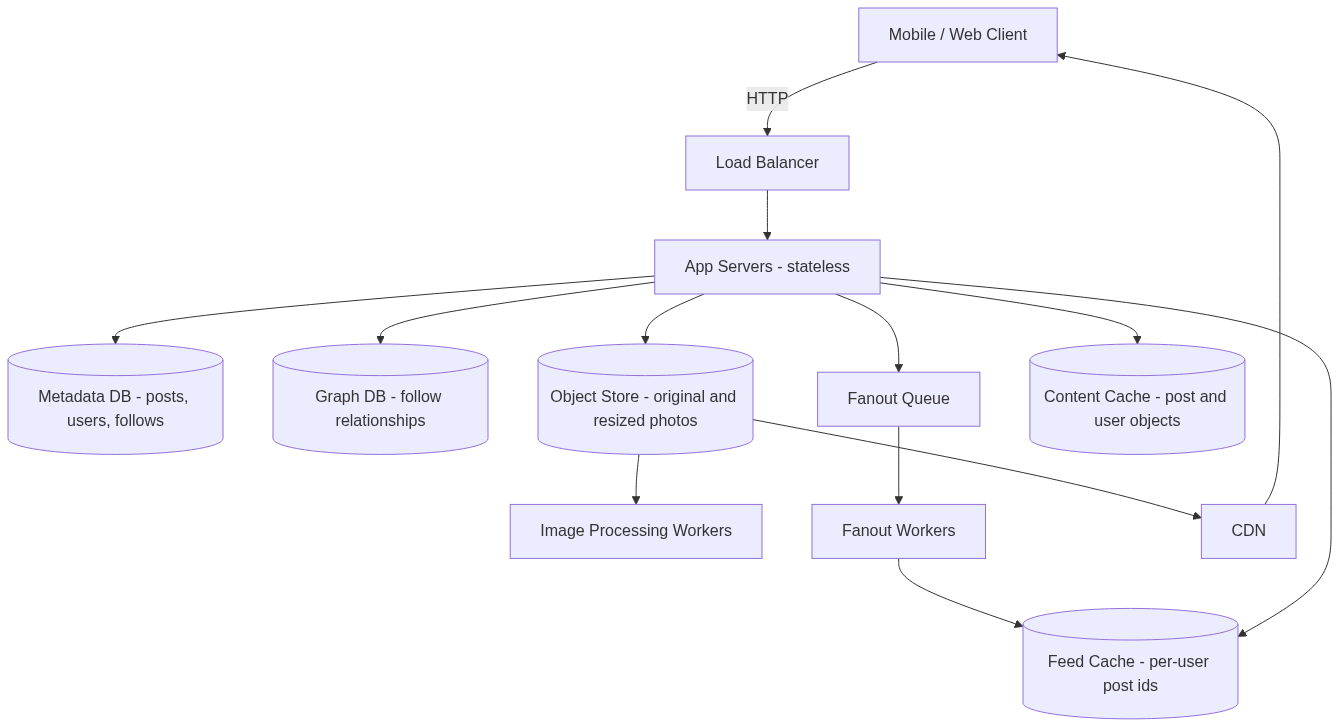
The app servers are stateless, so they scale horizontally behind the load balancer; the heavy lifting is in the media path (object store plus CDN) and the feed path (fanout plus caches).
Step 3: Design deep dive
Two things reward depth: how the feed is built (fanout), and how the media pipeline holds up under real traffic. Fanout is the classic probe, so start there.
Feed fanout: push, pull, or both
The core question: when a user posts, how does it get into their followers' feeds? Two models, opposite trade-offs.

Fanout on write (push). At post time, copy the new post's id into the feed cache of every follower. Reads are then trivially fast - a user's feed is already sitting there, precomputed. The cost is at write time: a post by someone with a million followers means a million cache writes. And you burn work precomputing feeds for followers who may never log in.
Fanout on read (pull). Store the post once. When a user opens the app, assemble their feed on the spot by pulling recent posts from everyone they follow. No write amplification, and nothing wasted on inactive users - but reads are now slow, doing a big gather-and-merge every single time, which is exactly the wrong place to be slow in a read-heavy app.
The answer is a hybrid, and being able to say why is the point. Use push for the common case: most users have a manageable follower count, so precomputing their followers' feeds is cheap and makes the hot read path instant. But for celebrities - accounts with millions of followers - push is a disaster: one post triggers millions of feed writes (the "hotkey" problem). So for those few high-fanout accounts, switch to pull: don't push their posts at all; instead, when a user reads their feed, merge in recent posts from the celebrities they follow at read time. Each follower does a tiny bit of read-time work, and you avoid the millions-of-writes explosion. Consistent hashing helps spread the feed-cache load so no single node becomes the hotspot. Naming the celebrity case and the push/pull switch is what separates a strong answer from a textbook one.
The push pipeline
Here's how the push side works when a normal user posts:

The post service persists the post, then fetches the author's follower ids from the graph store and drops the "distribute post X to these followers" job onto a message queue. Fanout workers pick it up asynchronously and append the post id to each follower's feed cache. Doing this through a queue is deliberate: it decouples the slow fanout from the user's post request (their upload returns immediately), it absorbs spikes, and if a worker dies the job is retried.
One critical detail: the feed cache stores only post ids, not full posts - think of each user's feed as a capped list of the most recent post ids. Storing whole post-and-user objects per follower would blow up memory many times over. You cap the list too (a few hundred ids), because almost nobody scrolls past the recent stuff, and older entries can always be pulled from the database on the rare deep scroll.
The read path: hydrate ids into a feed
Because the feed cache holds only ids, reading a feed is a two-step: get the ids, then hydrate them into full content.
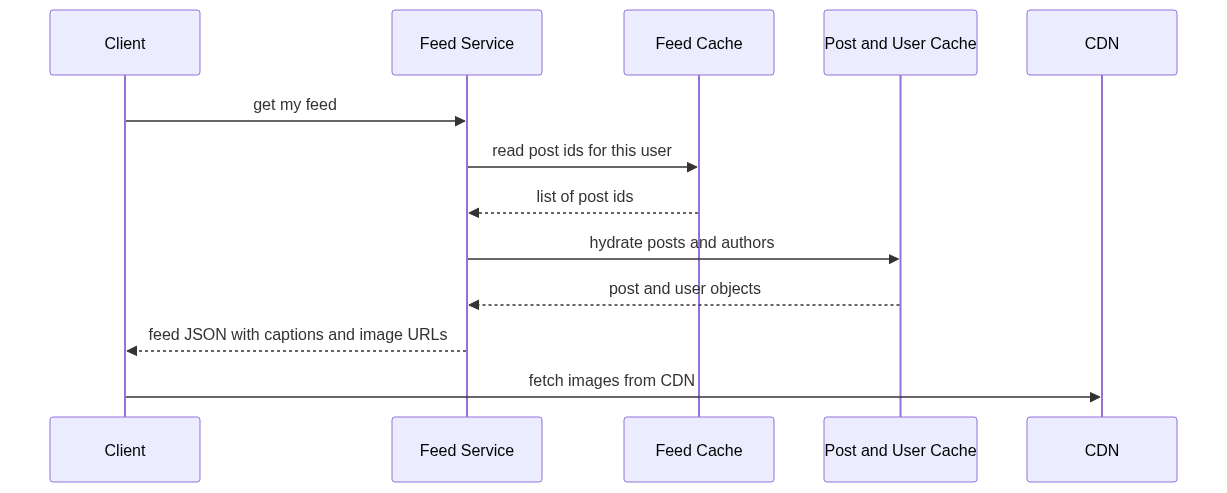
The feed service reads the id list from the feed cache, then fetches the full post objects (caption, author, image URLs) and author profiles from a content cache - a separate cache layer holding hot post and user objects so hydration rarely touches the database. It returns JSON: captions, metadata, and image URLs. The client then loads the actual image bytes from the CDN, sized to what it's showing (the thumbnail variant in the feed, the medium variant full-screen). Notice the split: your servers move small JSON; the CDN moves the petabytes of pixels.
Follow-up questions to expect
- A celebrity posts and it's viral - what breaks? Push would try millions of feed writes; that's why celebrities use pull instead, merged in at read time. On the media side, a viral photo is the CDN's best case, not worst - the first fetch in each region warms the edge cache and every subsequent viewer is served locally, so the origin sees a trickle regardless of how viral it goes.
- How do you keep upload from being abused? The app server authenticates before minting a presigned URL, and the URL is scoped (one object key) and short-lived, so it can't be reused to dump arbitrary files. Add per-user upload rate limits, and scan/validate the uploaded file type before publishing.
- What about storage cost - tens of PB a year forever? Tier it: keep recent and popular photos on fast storage, and move cold, rarely-viewed originals to cheaper archival tiers. You keep every original for durability but you don't pay hot-storage prices for a photo nobody has opened in three years.
- Feed consistency - can a follower miss a post? Fanout is asynchronous, so a new post appears in feeds a second or two late - fine for this product. If a fanout worker fails mid-job, the queue retries; if a feed-cache entry is ever lost, it can be rebuilt by pulling recent posts from the people that user follows.
- Ranked feed instead of chronological? Swap the ordering: instead of sorting the candidate post ids by time, score them with a ranking model (engagement, recency, affinity) before returning. The whole fanout-and-cache machinery is unchanged; only the ordering step at read time changes.
- Deep scroll past the cached window? The feed cache is capped at a few hundred ids. When a user scrolls past it (rare), fall back to querying the database for older posts from their followees - slower, but it's the cold path, so that's an acceptable trade.
Wrap up
The one-line recap: photos live in an object store fronted by a CDN, uploaded directly via presigned URLs and resized asynchronously into a few variants; metadata and the follow graph live in sharded databases; and the feed is a hybrid fanout - push post ids into per-follower feed caches for normal users, pull at read time for celebrities - where the cache holds only ids and the read path hydrates them from a content cache while the CDN serves the pixels.
The judgment worth restating: the two shapes from Step 1 drove every choice. Write-once, read-forever petabytes of media forced object storage plus CDN and kept photo bytes out of both the database and the app tier. A hundred-to-one read-heavy personalized feed forced precomputed, id-only feed caches and the push/pull hybrid to survive high-fanout accounts. Where it goes next is video (a transcoding pipeline and adaptive-bitrate streaming, the same object-store-plus-CDN spine carrying much heavier blobs), a ranked feed, and richer social features (likes, comments, notifications) - each a clean extension of this backbone. For the timing that keeps a design like this inside the hour, revisit the 60-minute interview framework.
Comments
Join the discussionNo comments yet. Be the first to comment.
System Design Guide
This guide is to help you with system design interviews, structuring the interviews and utilize your 60 minutes into different segments and activities.